

My little brother called me last year saying he wanted to make his apartment feel smarter.
He had just moved into his first place. Small bedroom, open living area, one bathroom. No existing smart devices, zero tech setup, just a regular apartment with normal outlets.
He asked me if he needed to buy a hub first. I told him no. He did not believe me. He had read somewhere that smart homes require hubs and he was convinced he needed to buy one before anything else.
I walked him through the whole setup over the phone in about 45 minutes. He now has smart lighting, a smart plug on his TV corner, and LED strips behind his desk. No hub anywhere.
This is that same walkthrough written out properly.
What Is a Hub and Why You Probably Do Not Need One
We covered this in detail in What Is a Smart Home Hub and Do You Actually Need One in 2026 but the short version is this.
A hub is a device that sits in the middle of your smart home and translates signals between devices and your phone. Three or four years ago, most smart home devices used wireless signals like Zigbee or Z-Wave that could not connect to WiFi directly. So they needed a hub to bridge the gap.
In 2026, most consumer-level smart home products connect directly to your home WiFi. No hub, no bridge, no middleman. You download an app, enter your WiFi password once, and you are done.
If you are buying mainstream products from brands like Kasa, Govee, Wyze, or Amazon, you almost certainly do not need a hub. The devices talk to your router directly and you control everything from your phone or a voice assistant.
What You Actually Need to Start
You need three things and only three things.
A WiFi router that reaches the areas where you want smart devices. A smartphone with the relevant apps. And a voice assistant speaker if you want hands-free control.
That is it. No hub. No bridge. No Ethernet cables running across your floor.
The voice assistant speaker is optional but most people end up getting one because saying "turn off the lights" from bed is genuinely better than opening an app. The Amazon Echo Dot is the easiest starting point for most people. Google Nest Mini if you are in the Google ecosystem.
Everything else you add connects into whichever platform you pick.
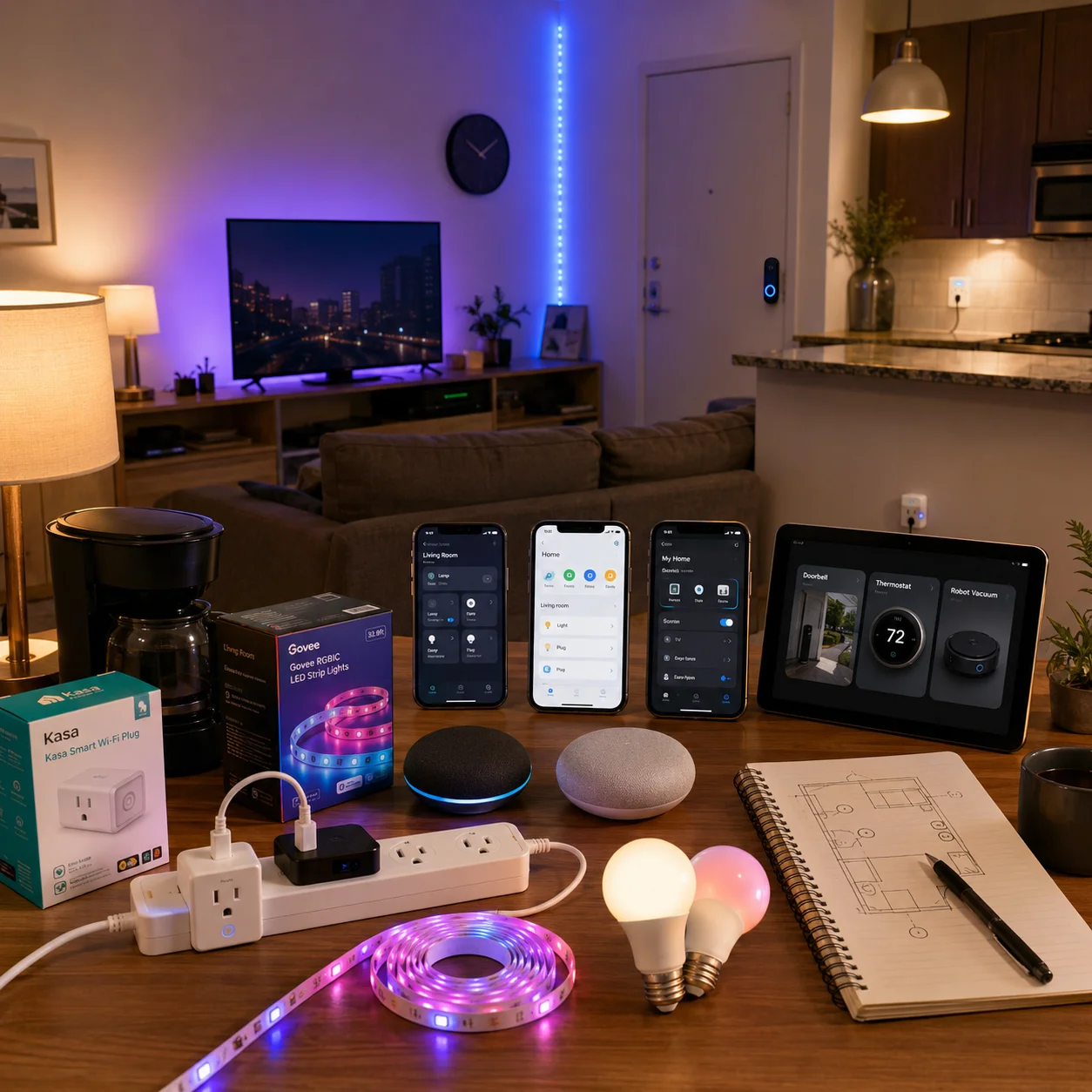 Step One: Pick Your Ecosystem First
This is the step most people skip and then regret.
Your ecosystem is the platform that ties everything together. Right now the main choices are Amazon Alexa, Google Home, and Apple HomeKit.
Alexa has the widest device compatibility and the largest library of compatible products. If you buy mostly budget smart home products, they almost always support Alexa. It is the easiest starting point for most people.
Google Home is tighter with Android phones and Google services. If you live on Google Calendar, Gmail, and your Android phone, Google Home feels more natural. It also has excellent voice recognition.
Apple HomeKit is the most privacy-focused option but has a more limited device selection. It requires a HomePod Mini or Apple TV acting as a home hub. Great for iPhone users who care about keeping data local.
My recommendation is to pick whatever matches the phone you already use and the smart speaker you are most likely to buy. Then stick with it. Trying to run all three platforms at once gets confusing fast.
If you want to future-proof completely, look for Matter-compatible devices. Matter works across all three platforms so you are never locked in. We covered the best Matter smart plugs in our best smart plugs guide if you want specific product picks.
Step Two: Start With Smart Plugs
The best first purchase for any beginner is a smart plug.
Not smart bulbs. Not a smart thermostat. A smart plug.
Here is why. A smart plug connects to your WiFi and makes any device plugged into it controllable from your phone. Your existing lamp, coffee maker, fan, or TV strip become smart devices without buying new ones.
The learning curve is basically zero. Plug it into your outlet. Download the app. Enter your WiFi password. Done. You now have remote control and scheduling on whatever is plugged in.
This is also how you learn what you actually want from a smart home before spending more money. After two weeks with a smart plug on your lamp you will know whether you want more automation or whether that was enough.
Our best smart plugs guide has the full breakdown of which ones to buy depending on your ecosystem. The Kasa EP25 4-pack at $29.99 is the best starting value for most people.
Step Three: Add Lighting
Once you have one or two smart plugs running, lighting is the next upgrade that makes your home feel actually different.
There are two ways to do smart lighting without a hub.
Smart bulbs screw into your existing fixtures and connect directly to WiFi. You replace your regular bulbs and control them from an app or voice command. Kasa and Sengled both make solid budget options that work without a hub.
LED strip lights are the other option and they are where a lot of people start because they are cheap, install in minutes, and dramatically change the feel of a room.
The Govee Smart LED Strip Lights are the ones I sent my brother first. The 16.4ft kit runs around $19.99 and the 32.8ft runs around $24 to $29 depending on the model and any active coupons. You peel the backing, stick them where you want, plug into a standard outlet, and connect through the Govee Home app in about five minutes.
They work with Alexa and Google Home for voice control. The music sync feature where the lights react to audio in real time is genuinely fun and not just a gimmick. I have mine on the gaming setup and switching to music sync during sessions makes the whole room feel different.
No hub needed at all. WiFi-only, direct to your router.
Step Four: Set Up One Voice Assistant
This is where the whole setup starts to feel like a real smart home.
Pick one voice assistant and set all your devices up under it. Do not try to run Alexa and Google Home together in the same space. It gets confusing for everyone in the house and device grouping gets complicated.
Once your smart plugs and lights are linked to Alexa or Google Home, you can control multiple devices with one command. "Alexa, goodnight" can turn off your lamp, cut power to your TV strip, and dim your LED strips all at once. That is one routine and you set it up once in the app.
The Alexa app and Google Home app both have a routine builder that is straightforward even if you have never done anything like this before. Pick the trigger, add the actions, save it. Takes five minutes.
Step Five: Build Slowly From Here
Here is the thing about smart homes. Most people buy everything at once, set it all up in a weekend, and then realize half of it never gets used.
The better approach is to add one category at a time and live with it for a few weeks before buying the next thing.
Smart plugs and lighting cover the basics. Once those are running and you have a few routines set up, you will naturally notice the next gap.
Maybe it is a video doorbell because you want to see who is at the door when you are not home. We broke down exactly how to pick the right one in Smart Doorbell vs Security Camera.
Maybe it is a smart thermostat because you want the temperature to adjust based on your schedule.
Maybe it is a robot vacuum because you want floors to handle themselves.
Each of those adds without a hub. They connect directly to WiFi and fold into your existing Alexa or Google Home setup without any reconfiguration.
Browse the full smart home devices section when you are ready to add the next layer. Everything there is organized by category so you can see what fits what you already have.
The One Thing That Actually Matters: Your WiFi
I want to say this clearly because nobody talks about it enough.
Your smart home is only as reliable as your WiFi.
If your router is in one corner of your home and you have dead spots in other rooms, your smart devices in those spots will disconnect randomly and feel broken. That is not a device problem. That is a network problem.
The fix is either moving your router to a more central location or adding a mesh WiFi system. Brands like Eero, TP-Link Deco, and Google Nest WiFi all make mesh systems that create a strong signal throughout your whole home. A basic two-pack eero system starts around $99 and solves most coverage problems in apartments and mid-size homes.
If your devices are connecting and disconnecting randomly, check your WiFi coverage before blaming the product.
Also one more thing. Most budget smart home devices only work on 2.4GHz networks. If your router runs both 2.4GHz and 5GHz on the same network name, some devices get confused and fail to connect. The fix is to split them into two separate network names in your router settings. Name one "HomeNetwork-2.4" and one "HomeNetwork-5" and connect smart devices to the 2.4GHz one. This solves setup failures that frustrate beginners more than anything else.
A Realistic Starter Budget
You do not need to spend much to make a real difference.
A smart plug 4-pack for around $30 covers four spots in your home immediately. An Echo Dot for $49.99 gives you a voice control center. A Govee LED strip kit for around $20 to $29 transforms one room visually.
That is around $100 to $110 total for a setup that actually feels smart. Three products, one ecosystem, no hub, and you can be done in an afternoon.
After that every product you add is incremental. You are building on a working foundation instead of starting over.
Final Thoughts
Setting up a smart home without a hub is not a workaround. It is just how most people do it in 2026.
Start with WiFi devices from established brands. Pick one voice assistant and stick with it. Set up a few routines that actually match how you live. Then add more devices slowly as you figure out what you actually use.
My brother's apartment has been running for eight months now with zero hubs and zero problems. He texts me occasionally to tell me about a new routine he set up. That is the goal.
FAQs
Do I really need a hub to start a smart home in 2026?
No. Most beginner-level smart home devices connect directly to your WiFi and work through their own apps or with Alexa and Google Home.
What is the easiest first smart home device to buy?
A smart plug. It requires zero new wiring, makes any device smart, and teaches you how app-based control works before you buy anything more complicated.
Can I use Alexa and Google Home on the same network?
Technically yes but it gets confusing fast. Pick one and set up all your devices under it for the cleanest experience.
What WiFi band do smart home devices use?
Most budget smart home devices connect to 2.4GHz WiFi only. If your setup is failing, make sure you are connecting on 2.4GHz and not 5GHz.
Do smart home devices work if my internet goes out?
Most WiFi-based consumer devices stop responding to voice commands and remote app control without internet. Basic physical buttons on the device still work. Matter devices with Thread can maintain local control.