Product Comparison
Select two products to compare their features, ratings, and specifications side by side.
AOC 24G2 Gaming Monitor
Product 1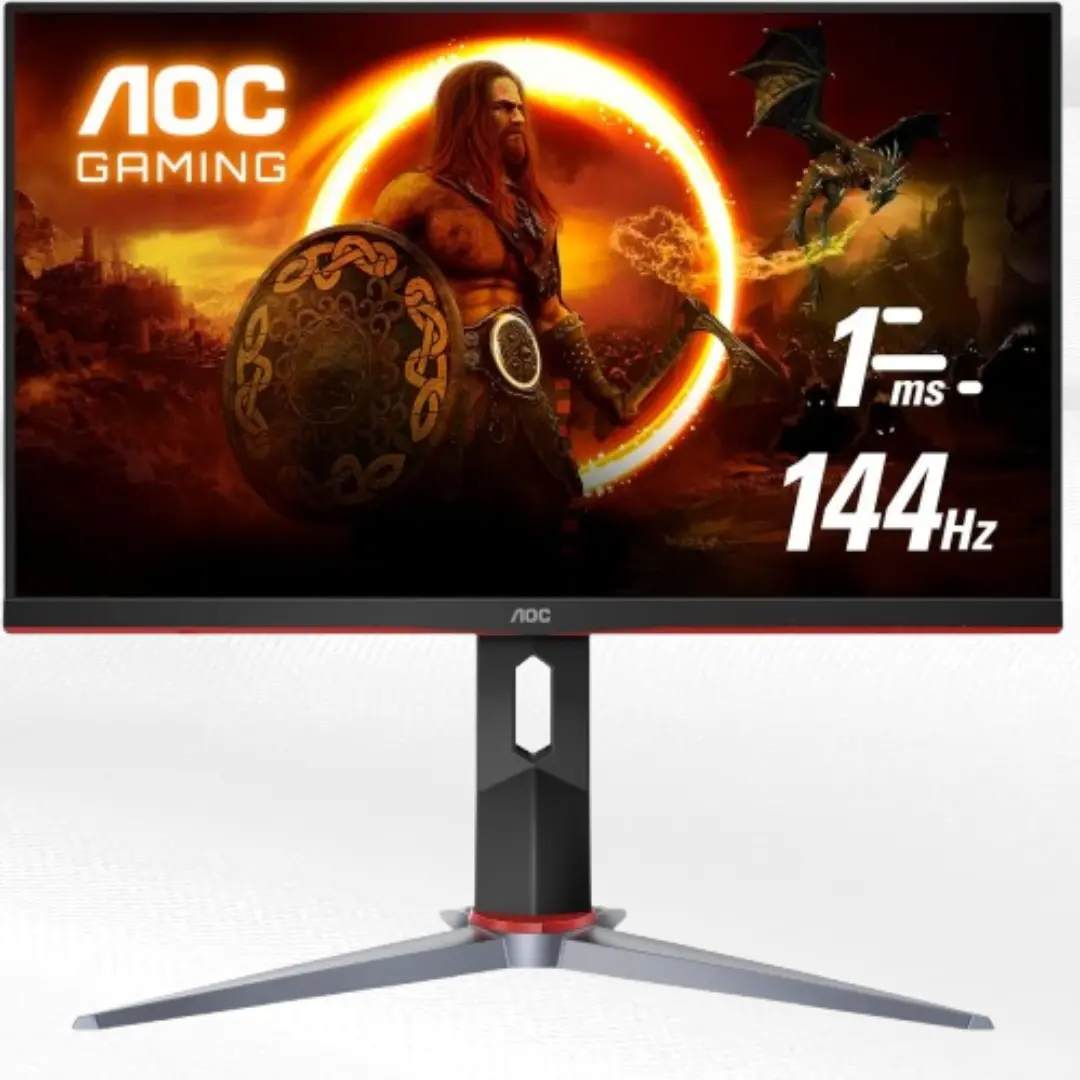
Honest AOC 24G2 review after 5 months use. Is this $119 IPS 144Hz gaming monitor the best budget option? Real pros/cons from daily use.
AOC 24G2 Gaming Monitor Review
Rating: 4.3/5 ⭐⭐⭐⭐☆
I've been using the AOC 24G2 as my main gaming monitor for 5 months. At $119, this might be the best budget gaming monitor deal right now. Here's my honest experience.
First Impressions
For $119, I expected compromises everywhere. The AOC 24G2 surprised me right out of the box. The stand feels solid, bezels are thin, and the overall build doesn't scream "budget monitor."
The red accents on the stand might not be everyone's taste, but they're subtle enough. The monitor looks way more expensive than it actually is.
Build Quality
What Impressed Me:
Surprisingly sturdy stand
Thin bezels look modern
No flex in the panel
Clean cable routing
Solid adjustments
Where They Cut Costs:
Plastic construction throughout
Stand base could be heavier
Power brick instead of internal PSU
Basic button controls
For $119, the build quality exceeds expectations. It's not premium, but it doesn't feel cheap either.
IPS Panel Performance
This is where the AOC 24G2 really shines for the price.
Colors:
Vibrant and accurate out of the box
Great viewing angles
sRGB coverage is solid for gaming
Much better than TN panels I've used
Brightness:
Gets plenty bright for most rooms
Good contrast for an IPS panel
Blacks could be deeper but acceptable
Coming from a TN panel, the color difference was huge. Games look more vibrant and content creation actually works well on this monitor.
Gaming Performance
144Hz Experience: Smooth gaming across all genres. The jump from 60Hz to 144Hz is massive, especially in competitive games.
Response Time (1ms MPRT): Minimal ghosting in fast games. Not quite as snappy as premium TN panels, but 95% of gamers won't notice the difference.
Input Lag: Feels instant. No noticeable delay in competitive games like Valorant or Apex Legends.
FreeSync Performance: Works great with AMD cards. Also compatible with NVIDIA GPUs - no tearing issues with G-Sync compatible mode enabled.
Real Gaming Tests
FPS Games: Excellent for competitive gaming. Smooth tracking, good motion clarity, colors help spot enemies.
RPGs/Single Player: This is where IPS shines. Gorgeous colors make games like Cyberpunk and God of War look amazing.
Strategy Games: Perfect for RTS games. Good color accuracy helps distinguish units and UI elements.
Streaming/Content: Works great as a secondary monitor for streaming software. Colors accurate enough for basic content creation.
Ergonomics & Features
Stand Adjustments:
Height: 130mm range
Tilt: -5 to +23 degrees
Swivel: ±30 degrees
No pivot (portrait mode)
The adjustments cover most use cases. Wish it had pivot, but that's rare at this price.
Connectivity:
2x HDMI 1.4 (144Hz supported)
1x DisplayPort 1.2
1x VGA (why?)
3.5mm audio out
Good selection for the price. Both HDMI ports support 144Hz, which is great for console gamers.
After 5 Months Daily Use
What's Holding Up:
Colors still look great
No dead pixels or backlight bleed
Stand adjustments still smooth
Performance remains consistent
Minor Issues Developed:
Very slight backlight bleed in bottom corner (barely noticeable)
Stand makes tiny creak when adjusting (doesn't affect stability)
Overall, it's aged well with daily 8-10 hour use.
Color Accuracy & Calibration
Out of Box: Colors looked good immediately. I tweaked brightness down slightly but otherwise used default settings.
For Gaming: More than accurate enough. Vibrant colors enhance the gaming experience without being oversaturated.
For Work: Good enough for basic photo editing and design work. Not professional-grade but surprisingly capable.
Value Comparison at $119
This is where the 24G2 dominates:
vs Other $119 Monitors: Most are still 60Hz or use TN panels. Getting 144Hz IPS at this price is rare.
vs $200+ Options: You lose some premium features but get 80% of the performance for half the price.
vs Budget TN Panels: Similar gaming performance but much better colors and viewing angles.
Who Should Buy This
Perfect For:
First-time 144Hz upgraders
Budget-conscious competitive gamers
Anyone wanting IPS colors for gaming
Console gamers (HDMI 144Hz support)
Students needing gaming + productivity
Maybe Skip If:
You need professional color accuracy
Want 1440p resolution
Need premium build materials
Require advanced gaming features
Competitive Gaming Reality
I play Valorant, CS2, and Rocket League regularly on this monitor.
Performance: Smooth 144Hz gameplay, good motion clarity, zero input lag issues. Colors actually help spot enemies better than washed-out TN panels.
Compared to Premium Gaming Monitors: 90% of the performance for 50% of the price. Unless you're going pro, you won't miss the extras.
The $119 Question
Is this really worth $119? Absolutely.
What You're Getting:
144Hz refresh rate
IPS panel colors
Solid build quality
Good gaming performance
Multiple connectivity options
What You're Missing:
Premium materials
Advanced gaming features
Higher resolution options
Perfect color accuracy
At this price, the compromises are totally acceptable.
Real Talk
The AOC 24G2 punches way above its weight class. Getting 144Hz IPS performance for $119 felt impossible a few years ago.
It's not perfect - the stand could be better, colors aren't reference-grade, and it lacks premium features. But for most gamers, especially those upgrading from 60Hz, this hits the sweet spot perfectly.
I've recommended this monitor to three friends, and all are happy with their purchase. That says something about its real-world value.
Final Thoughts
Five months later, I'm still impressed by what AOC achieved at this price point. The 24G2 proves you don't need to spend $300+ for a good gaming experience.
If you're looking for your first 144Hz monitor or upgrading from an old display, this should be at the top of your list. The combination of IPS colors, 144Hz smoothness, and solid build quality at $119 is hard to beat.
Sure, spending more gets you nicer things. But for most people, this monitor delivers everything they need for competitive gaming and daily use.
Bottom Line: Best value 144Hz gaming monitor under $150. Perfect upgrade for budget-conscious gamers who want both performance and good colors.
Select Product 2
Choose a product to compare
Want to list your gadget on RankMyGadget?
Get your product in front of thousands of gadget lovers and tech enthusiasts who are ready to buy
Free listing • Quick approval • Get user votes and reviews